Skip to content


Black Friday is here, Cyber Monday is just around the corner, and plenty of us will be spending the weekend hunting for a bargain, checking delivery updates and doing a bit of online shopping.
But while we’re busy looking for deals, scammers are looking for opportunities too.
As the working week comes to an end, many offices will be quieter over the weekend. If something does go wrong, it might not be picked up until Monday morning.
It’s nothing to panic about, but there are a few simple things worth doing before closing the laptop for the weekend.
Here’s our quick guide to staying cyber safe over the Black Friday weekend.
Why This Weekend Is Different
It’s not necessarily more dangerous than any other weekend. It’s the combination of increased online activity, busy inboxes and fewer people keeping an eye on things that makes it worth being prepared.
There are three things to watch out for:
-
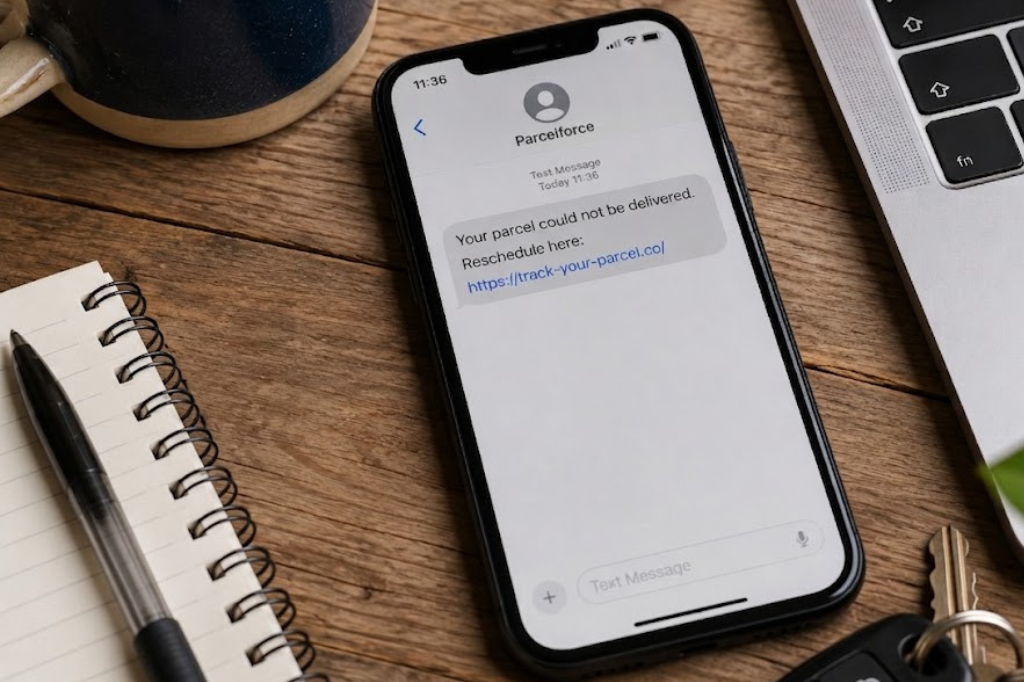
Fake offers and delivery messages: Scammers know people are expecting plenty of deals and parcel updates. Fake messages can easily get lost among genuine notifications.
-
Mixing work and personal devices: Shopping on a work laptop, using a work email address or reusing your work password on shopping websites can create unnecessary risks.
-
Fewer people around to spot problems: If something suspicious happens on Saturday or Sunday, there might not be anyone available to flag it or help straight away.
A little preparation before the weekend can make a big difference.
Before You Log Off: Five Minutes That Help
Before switching off for the weekend, run through these five simple checks.
1. Keep work and shopping separate
Avoid using your work email address or work passwords on shopping websites. It’s also best to keep personal shopping away from work devices wherever possible.
2. Lock and log out
Close anything you don’t need, lock your laptop and make sure devices are switched off or stored somewhere secure.
3. Know who to contact
Make sure you know how to contact your IT support team if something goes wrong. Save the relevant phone number or email address somewhere accessible outside your work inbox.
4. Check your phone security
If you use your phone to access work emails or applications, make sure it’s protected with a PIN, fingerprint or facial recognition.
5. Think before clicking
Be cautious of unexpected offers, delivery notifications and messages claiming there’s a problem with an order. If something feels urgent or unusual, don’t follow the link. Go directly to the retailer’s official website or app instead.
If You Think You’ve Clicked Something You Shouldn’t Have
First things first, don’t panic.
It happens to careful people, and reporting something quickly is always better than hoping it goes away.
If you think you’ve clicked a suspicious link or entered information somewhere you shouldn’t have, here’s what to do:
-
Stop what you’re doing. Don’t enter any more information or download anything else.
-
Disconnect if necessary. If you’ve downloaded something suspicious onto a work device, disconnect it from the network by switching off Wi-Fi or unplugging the network cable.
-
Change affected passwords. If you’ve entered login details, change the password from a different, trusted device. Prioritise any passwords that are also used for work accounts.
-
Tell someone straight away. Contact your IT support team using the details you saved earlier. Don’t wait until Monday.
-
Report suspicious emails. You can forward suspicious emails to the NCSC’s Suspicious Email Reporting Service.
Not sure whether it was a scam? Report it anyway.
It’s always better to have a false alarm than an incident that goes unnoticed.
What If Something Stops Working?
Cyber security isn’t the only thing worth thinking about over a long weekend.
If your email, files or another business system suddenly stops working, start by checking whether the problem is affecting just you or other people too.
Try another device or contact a colleague if possible.
If the issue appears to be affecting multiple people, make a note of what happened and when it started before contacting your usual IT support route.
Avoid repeatedly restarting devices or attempting fixes you’re unsure about. This can sometimes make it harder to identify the original problem.
For Managers: Three Things to Agree Before the Weekend
If you’re responsible for a team or business, it’s worth taking a few minutes to make sure everyone knows what to do if something goes wrong.
Here are three things to agree before finishing for the week:
1. Who is the point of contact?
Identify one person, plus a backup, who can be contacted if something urgent happens over the weekend.
2. How will you reach everyone?
Make sure there’s a way to contact your team that doesn’t rely on work email. A group chat or text list could be useful.
3. Does everyone know how to report a security concern?
Make it clear who people should contact if they think they’ve clicked something suspicious. Encourage people to speak up quickly, without worrying about blame.
If you’re looking to improve your wider IT arrangements, we’ve also covered who covers IT when everyone’s off and why it’s important to get the security basics right.
The Bottom Line
Most people will get through the Black Friday weekend without a problem, and hopefully that will be the case for your business too.
But taking a few minutes to prepare now means everyone knows what to do if something doesn’t go to plan.
Enjoy the deals, take your time when shopping online and don’t ignore anything that looks suspicious.
And remember, if something does go wrong, report it as soon as possible. Your IT support team would much rather hear about a potential problem early than discover a bigger one on Monday morning.
Need a hand preparing your business for the unexpected?
At Gardner Systems, we help businesses protect their technology, keep systems running and deal with IT challenges when they arise.
Get in touch with our team to find out how we can help.